2021–2023

TRADING
PLATFORM.

ROLE AT THE TIME
Mid-level UX Designer · Contract
MY CONTRIBUTION
Mobile UX · Design system
WORKING ARRANGEMENT
Remote

THE CHALLENGE

BRINGING A WEB TRADING PLATFORM TO MOBILE

The team was redesigning a trading platform that brokers could offer under their own brand. There was no mobile version yet. The challenge was to preserve the depth of the web product while organising market overview, instrument research and order entry into a clear sequence on a small screen.

The design needed to keep the main journey clear, with additional parameters available when needed, accommodating different levels of trading experience.

MOBILE PLATFORM

From market overview
to order entry.

Explore the mobile experience: find an instrument, review market information and configure an order.

Explore mobile demo

APPROACH

REVEAL DETAILS WHEN THEY ARE NEEDED

On the web, several panels can remain visible at once. On mobile, that structure leaves less room for data and controls. I separated market overview, instrument research and order entry into dedicated screens, giving each stage its own structure.

The order form brings essential parameters together, with additional settings available in context. This keeps the main flow accessible while allowing more detailed configuration when needed.

MY ROLE · MOBILE UX

FROM SHARED FOUNDATIONS TO MOBILE FLOWS

As a mid-level contract UX designer, I worked with a Product Owner and a small development team comprising a backend developer and a frontend developer. I created and maintained the platform’s design system and designed the screens, navigation and interactions for its first mobile version.

My work spanned the web trading platform, mobile experience, back-office interfaces and internal marketing products supporting promotion, alongside creating and maintaining the shared design system. This case focuses on the platform’s first mobile version.

DESIGN DECISIONS · MOBILE JOURNEY

01. FROM OVERVIEW TO RESEARCH AND ORDER ENTRY

The overview is the starting point. The instrument list and filters help users find a market. Instrument details and information tabs provide room to research before opening an order.

The order form brings together direction, quantity, order type and margin, with optional Stop Loss and Take Profit settings. Users can review their parameters before continuing. Explore this sequence in the demo above.

The trade-off: separating the stages gives information and controls more space, but requires more transitions than a web interface with several open panels.

DESIGN DECISIONS · SHARED PATTERNS

02. CONSISTENT COMPONENTS FOR WEB AND MOBILE

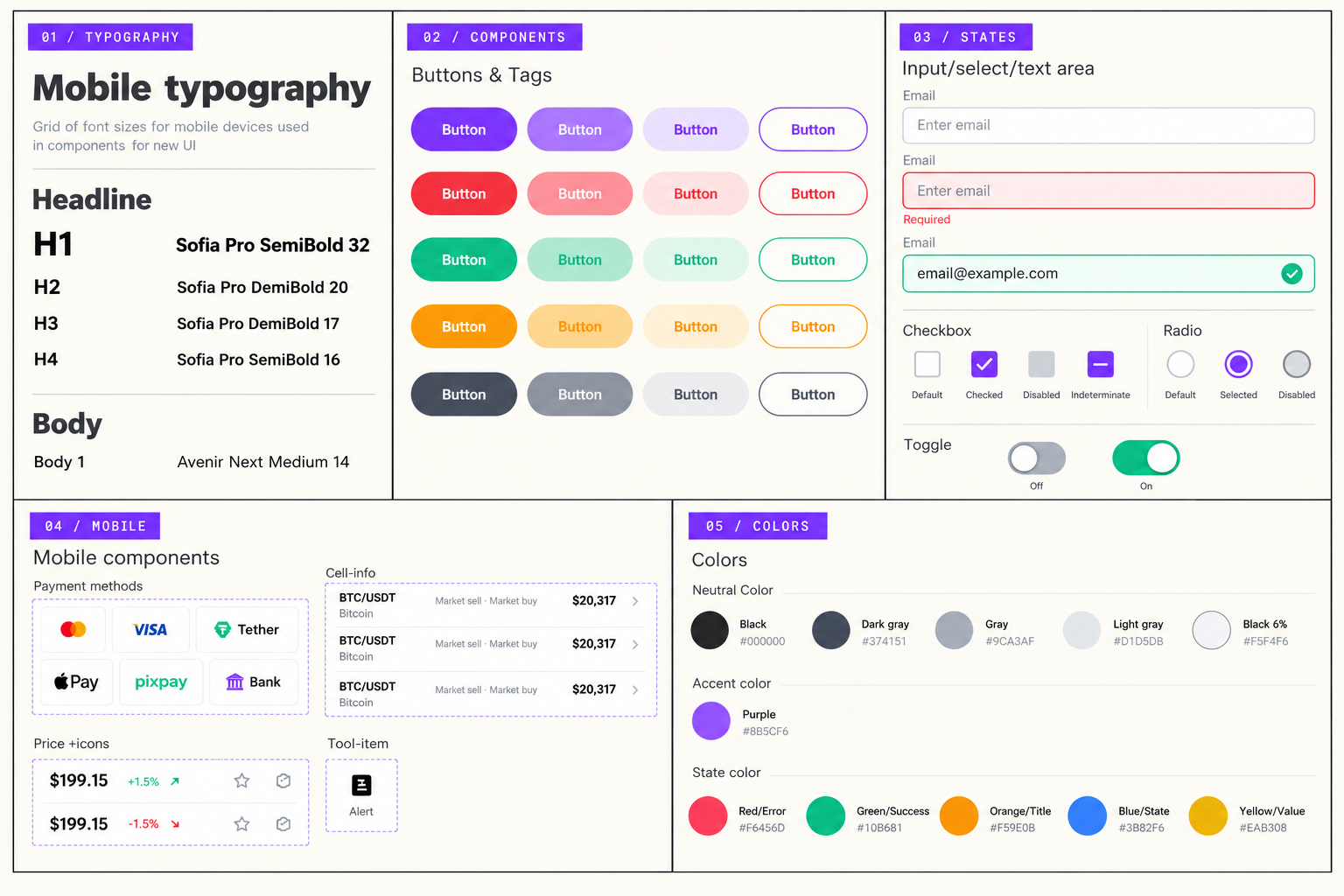
I created and maintained the platform’s design system, defining typography, colours, buttons, fields and control states, and bringing recurring interface elements into a consistent set of rules.

The team used the system to implement the product. For the first mobile version, I applied shared components and patterns across navigation, information tabs and the order form, adapting them to a small screen.

Design system excerpts: typography, buttons, fields and control states, mobile components and colours
Design system excerpts ↗

OUTCOME · IMPLEMENTED IN THE PRODUCT

IMPLEMENTED MOBILE EXPERIENCE AND SHARED DESIGN SYSTEM

The mobile interfaces and shared design system were implemented in the product, connecting the trading journey through consistent components and interaction patterns.

Product analytics had not yet been implemented during my time on the project, and business metrics were not available to me as a contract designer. The outcome is therefore presented through the implemented scope, flow structure and interface consistency.

PRODUCT LINK

EXPLORE THE CURRENT PRODUCT WEBSITE

The website is provided as a reference to the current product. It may reflect later changes beyond the scope of the work shown here.

VISIT WEBSITE